
- 10:30
- Omar · pickup
- 12:15
- Lina · deliver
- 16:00
- Noor · next
Deliver Better
Everything a driver needs, nothing they don't
Drivers see their pickups and deliveries, navigate to each address, and update order status with a tap — no paperwork needed.
- Today's jobs at a glance
A clear list of pickups and deliveries with customer details and notes.
- Built-in navigation
Open directions to each stop and call the customer from the app.
- Tap to update status
Mark orders picked up or delivered and the whole team sees it instantly.
- Collect payments
Record cash or online payments at the door.
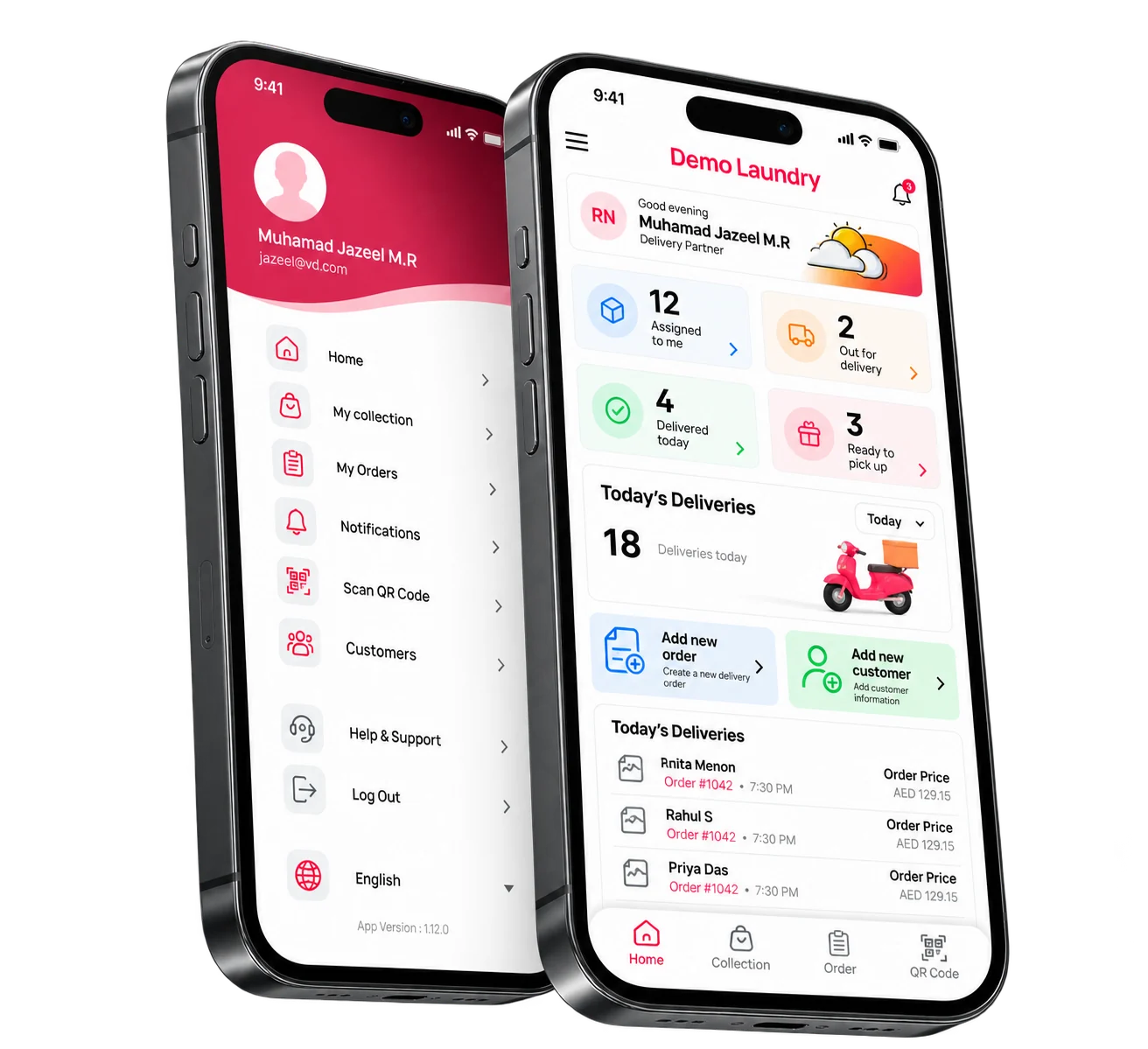
The driver opens the app to today's numbers: assigned, out for delivery, delivered, and ready to pick up. The menu holds My Orders, Scan QR Code, and Customers, so nobody calls the shop to find the next job.
Next stopTom Raj
The next door is 2.8 km away and due at 6:30 pm. Call is one tap.
- Customer
- Noor Ali
- Address
- Al Wasl, Villa 12
- Job
- Pickup curtains
- Distance
- 2.8 km
- Arrival
- 6:30 pm
- Call
- One tap
Four screens, one run
Built for the driver. Sold to the owner. Each stop has the address, the job, and one tap to call or collect.
- Next
- Al Wasl, Villa 12
- Away
- 2.8 km
- Arrive
- 6:30 pm
- Tap
- Arrived
- Tap
- Picked up
- Tap
- Delivered
- Order
- QRD-4409
- Due
- AED 18.00
- Scan
- Bill QR
A driver's day
Six stops, one driver, and the amount still to collect at the door.
6Stops
1Driver
2.8 kmNext door
AED 18To collect
TimeStopJobStatus10:30Omar Hassan, Marina GatePickup QRD-4408Done12:15Lina Joseph, JLTDeliver QRD-4409On the way16:00Noor Ali, Al WaslPickup curtainsNext17:30Marina HotelDeliver 12 shirtsQueued
1
Today's stops, in order, with the address and what to collect.
Drivers open the app and see today's stops in order. Each one shows the customer, address, items, and any notes — with one tap to navigate and one tap to call.
- Pickup and delivery list for the day
- One-tap directions and calling
- Order items and special instructions
- Weekly and monthly delivery counts
Each stop carries the address, the job, and the customer's number. The shop sees the status as soon as the driver taps it.
2
No more paperwork on the road
The shop sees the update as soon as the driver taps it.
Instead of paper slips and phone calls back to the store, drivers update everything in the app. The store sees it immediately and the customer is kept in the loop.
- Mark picked up or delivered
- Record payment collected
- Add new orders during pickup
- Status syncs to the store in real time
Next stopTom Raj
The next door is 2.8 km away and due at 6:30 pm. Call is one tap.
- Customer
- Noor Ali
- Address
- Al Wasl, Villa 12
- Job
- Pickup curtains
- Distance
- 2.8 km
- Arrival
- 6:30 pm
- Call
- One tap
3
How Driver App works
- 1
Driver logs in
They see today's assigned pickups and deliveries.
- 2
Completes each stop
Navigate, collect or deliver, and take payment if needed.
- 3
Updates sync instantly
Status and payments flow back to the store in real time.
Included with Driver App
Today's jobs at a glance
A clear list of pickups and deliveries with customer details and notes.
Built-in navigation
Open directions to each stop and call the customer from the app.
Tap to update status
Mark orders picked up or delivered and the whole team sees it instantly.
Collect payments
Record cash or online payments at the door.
Scan QR codes
Scan the bill's QR code to open the right order instantly.
Simple by design
Big buttons and a clean layout — drivers learn it in minutes.
Questions about Driver App
Which phones does the Driver App work on?
The Driver App works on Android and iOS smartphones.
Can drivers create new orders?
Yes. Drivers can place orders directly during pickup, which then appear at the store.
Can I see what each driver has done?
Yes. Reports show pickups and deliveries completed by each driver.
Is training needed?
Very little. The app is designed to be simple, and our onboarding team helps get your drivers started.
Use it with
See Driver App with your own orders
Give drivers the tools they need on the road. Book a demo and we will walk through it on your laundry.